


Today’s post is just a quick follow up to the last one, on using HFM dimension tables. The disclaimers from the last post still apply. We will be looking at additional code to generate the dimension extracts from HFM’s Account tables. As mentioned in the last post, the accounts dimension has additional attributes and additional tables to take into account while setting up the metadata extract.
For instance, the ACCOUNT_ITEM table tells us that we can derive attributes such as Account Type, IsICP, PlugAccount etc. from the base table.
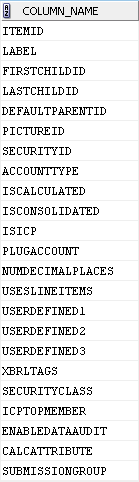
EPMA confirms the above, but in a more user-friendly manner. I hope the direct correlation between the columns in the screenshot above and below is not lost on anyone.
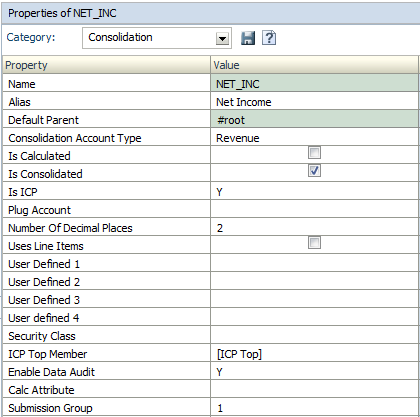
The base query to do this might look like the code snippet below:
select  par.label FPARENT,           -- Parent
        ch.label FCHILD,             -- Child
        de.description FDESCRIPTION, -- Description
        decode(ch.accounttype, 0, 'Revenue',
                               1, 'Expense',
                               2, 'Asset',
                               3, 'Liability',
                               4, 'Balance',
                               5, 'Flow',
                               7, 'CurrencyRate',
                               '') FACCTTYPE,
        decode(ch.iscalculated, 0, 'False', 'True') FISCALCULATED,      -- HFM IsCalculated
        decode(ch.isconsolidated, 0, 'False', 'True') FISCONSOL,        -- HFM IsConsolidated
        decode(ch.isicp, 0, 'N', 'Y') FISICP,                           -- HFM IsICP
        ch.numdecimalplaces FDEC,    -- HFM DecimalPlaces
        decode(ch.useslineitems, 0, 'False', 'True') FLINEITEMS,        -- HFM UsesLineItems
        ch.userdefined1 FUD1,        -- User Defined1
        ch.userdefined2 FUD2,        -- User Defined2
        ch.userdefined3 FUD3,        -- User Defined3
        decode(ch.securityclass, -1, '', sec.label) FSECCL,             -- SecurityClass
            ch.calcattribute FCALC,  -- Calc Attribute
        ch.submissiongroup FSUBG     -- Submission Group
from
hfm_account_layout ly,       -- Layout [stores hierarchy relationships]
hfm_account_item ch,         -- Get Child values
hfm_account_item par,        -- Get Parent values
hfm_account_desc de,         -- Description table
hsv_hfm_secclasses sec       -- Security Classes table
where ly.itemid = ch.itemid    -- Join for hierarchy relationships
and ly.parentid = par.itemid
and ch.itemid = de.itemid (+)            -- Outer join for descriptions
and ch.securityclass = sec.itemid (+)    -- Outer join for sec classes
order by par.itemid,                     -- Ordering
ly.prevsiblingid,
ch.itemid,
ly.nextsiblingid;
At this point, we have all the account-related master data, except for attributes like ICPTopMember, PlugAccount and Custom Top Members. To link up that data with our base query above, we will need help from a few extra tables:
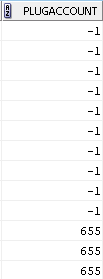
- ACCOUNT_ITEM table: This will help us get the PlugAccount. The join can be done through the ITEMID and the PLUGACCOUNT columns.
- ICP_ITEM: This will allow us to get the ICP top member name.

- ACCOUNT_CUSTATTR: This will allow us to retrieve the Custom dimension top members. The NVALUE column will be used to perform the join.
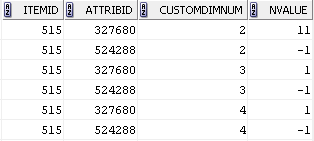
- CUSTOM_ITEM: this table, which we are familiar with, from the last post, will provide the names for the custom dimension top members.
Once we have those extra joins set up, our accounts query may look like:
select  par.label FPARENT,           -- Parent
        ch.label FCHILD,             -- Child
        de.description FDESCRIPTION, -- Description
        decode(ch.accounttype, 0, 'Revenue',
                               1, 'Expense',
                               2, 'Asset',
                               3, 'Liability',
                               4, 'Balance',
                               5, 'Flow',
                               7, 'CurrencyRate',
                               '') FACCTTYPE,
        decode(ch.iscalculated, 0, 'False', 'True') FISCALCULATED,      -- HFM IsCalculated
        decode(ch.isconsolidated, 0, 'False', 'True') FISCONSOL,        -- HFM IsConsolidated
        decode(ch.isicp, 0, 'N', 'Y') FISICP,                           -- HFM IsICP
        plg.label FPLUG,                                                -- HFM PlugAccount
        ch.numdecimalplaces FDEC,                                       -- HFM DecimalPlaces
        decode(ch.useslineitems, 0, 'False', 'True') FLINEITEMS,        -- HFM UsesLineItems
        ch.userdefined1 FUD1,        -- User Defined1
        ch.userdefined2 FUD2,        -- User Defined2
        ch.userdefined3 FUD3,        -- User Defined3
        decode(ch.securityclass, -1, '', sec.label) FSECCL,             -- SecurityClass
        icp.label FICPTOP,           -- ICP Top Member
        ch.calcattribute FCALC,      -- Calc Attribute
        ch.submissiongroup FSUBG,    -- Submission Group
        c1.label FC1TOP,             -- Custom1 Top Member
        c2.label FC2TOP,             -- Custom2 Top Member
        c3.label FC3TOP,             -- Custom3 Top Member
        c4.label FC4TOP              -- Custom4 Top Member
from
hfm_account_layout ly,       -- Layout [stores hierarchy relationships]
hfm_account_item ch,         -- Get Child values
hfm_account_item par,        -- Get Parent values
hfm_account_desc de,         -- Description table
hsv_hfm_secclasses sec,      -- Security Classes table
hfm_account_item plg,        -- Account table to get Plug value
hfm_icp_item icp,            -- ICP table to get ICP Top
hfm_account_custattr attr1,  -- Account attribute table Custom members
hfm_custom_item c1,          -- Custom dimension table
hfm_account_custattr attr2,
hfm_custom_item c2,
hfm_account_custattr attr3,
hfm_custom_item c3,
hfm_account_custattr attr4,
hfm_custom_item c4
where ly.itemid = ch.itemid                      -- Join for hierarchy relationships
and ly.parentid = par.itemid
and ch.itemid = de.itemid (+)                    -- Outer join for descriptions
and ch.securityclass = sec.itemid (+)            -- Outer join for sec classes
and ch.plugaccount = plg.itemid (+)              -- Outer join for plug account
and ch.icptopmember = icp.itemid (+)             -- Outer join for ICP top
and ch.itemid = attr1.itemid (+)                 -- Outer join for Custom1 top member
and  attr1.customdimnum = 1 and c1.ldimid = 1    -- Focus on Custom1 only
and attr1.nvalue = c1.itemid (+)                 -- Outer join for Custom1 top member
and ch.itemid = attr2.itemid (+)                 -- Rinse & repeat for additional custom dimensions
and  attr2.customdimnum = 2 and c2.ldimid = 2
and attr2.nvalue = c2.itemid (+)
and ch.itemid = attr3.itemid (+)
and  attr3.customdimnum = 3 and c3.ldimid = 3
and attr3.nvalue = c3.itemid (+)
and ch.itemid = attr4.itemid (+)
and  attr4.customdimnum = 4 and c4.ldimid = 4
and attr4.nvalue = c4.itemid (+)
order by par.itemid,                     -- Ordering
ly.prevsiblingid,
ch.itemid,
ly.nextsiblingid;
Notice, there are additional joins needed for each custom dimension you may have in your application.
ch.itemid = attr1.itemid (+)
and  attr1.customdimnum = 1 and c1.ldimid = 1
and attr1.nvalue = c1.itemid (+)
For each custom dimension in your application, you will need to retrieve member names from the CUSTOM_ITEM table. Of course, there may be more elegant ways to do this, but, this works for me.
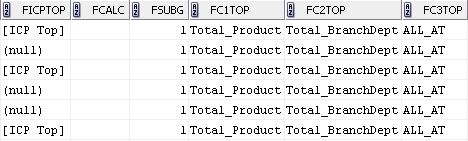
And finally, our query gives us the results that we need.

